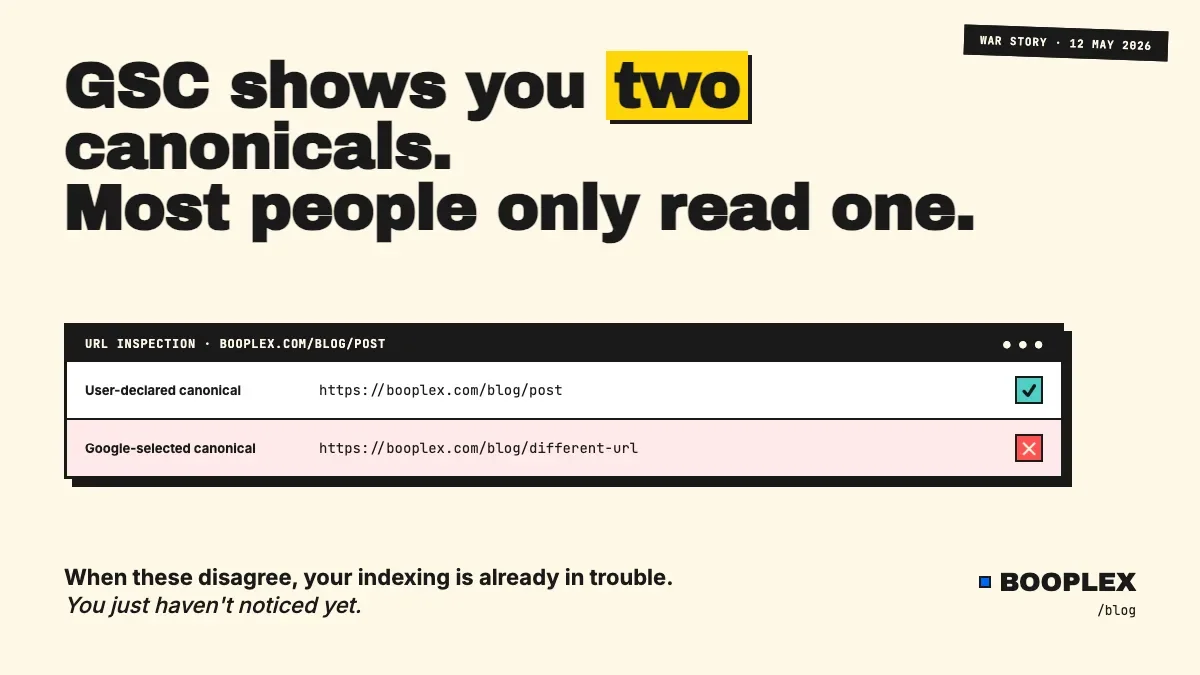
Someone on LinkedIn told me a couple weeks back: "I believe GSC shows you the user-declared canonical when you try to inspect any of your URL."
Almost.
GSC URL Inspection shows you the canonical your canonical two canonicals. One you declared. One Google picked. When they disagree, your indexing is already in trouble — you just haven't noticed yet.
This is the gap I missed for weeks during my own localhost canonical disaster. The tool I trusted was telling me the truth. I just wasn't reading all of it.
The myth: GSC shows your canonical
Open any URL in GSC's URL Inspection. Click "Coverage" or scroll to the page details. You'll see a row labelled something like "User-declared canonical" — the URL you put in your <link rel="canonical"> tag.
Most people stop reading there. The URL matches the live page. Job done.
It isn't.
The reality: GSC shows two
Right under "User-declared canonical," there's another row: "Google-selected canonical."
This is the URL Google actually chose to index. It's not always the same as the one you declared.
When they match, you're fine. When they don't, one of these is happening:
- Google thinks your declared canonical points to a duplicate or near-duplicate
- Your declared canonical is unreachable (404, soft 404, redirect chain)
- Internal links across your site point to a different URL than the canonical claims
- HTTPS/HTTP confusion (rare in 2026 but I've seen it)
- Mobile/desktop variant confusion
- A more authoritative version of the page exists elsewhere (other sites, scraped copies)
Google's word wins. Always. The declared canonical is a hint. The Google-selected canonical is what gets indexed, ranked, and shown in search results.
The war story (how I learned this the hard way)
A few weeks back I shipped a post about a canonical URL bug where my Next.js site was rendering http://localhost:3000 into the production HTML. Classic process.env.SITE_URL || 'http://localhost:3000' fallback, working perfectly in dev, catastrophic in prod.
What I haven't talked about is the part where GSC was telling me the truth the whole time, and I missed it.
When I first noticed indexing was rotting, I inspected a few URLs. The user-declared canonical row said https://booplex.com/blog/whatever — exactly what I expected. Looks fine, I thought, and went to chase other ghosts.
What I didn't read carefully: the Google-selected canonical row said something else. I can't reproduce the exact value from memory, but it wasn't matching the declared one. Google had quietly decided my pages weren't worth indexing as the canonicals I'd nominated.
If I'd read the second row first, I'd have caught it in 5 minutes instead of 5 days.
How to actually check (the part that doesn't lie)
Here's the workflow I now run every time I touch anything indexing-adjacent:
- Open GSC URL Inspection for a representative URL from each template type (one blog post, one project page, one tools page, one home).
- Compare both canonical rows. They must match. Not "close." Identical, character for character.
- If they don't match, check what Google selected and ask why. The usual suspects: a redirect chain, a stronger internal link target, or a duplicate URL elsewhere.
- Pair GSC with a live HTML check — because GSC can be hours or days stale. View source on the live page. Confirm the
<link rel="canonical">tag matches what you expect. (I built the canonical checker for exactly this — paste a URL, get the canonical it's actually serving right now.) - Crawl your own internal links. If 80% of your internal links to a page use a slightly different URL than your declared canonical, Google might pick the URL your own site signals more strongly.
- Check your sitemap. If your declared canonical isn't in your sitemap, Google has another reason to wonder why you don't believe in it either.
The two-tool combo — GSC for what Google sees, the canonical checker for what your server is serving right now — is the only way to catch the gap. GSC alone lags. Live HTML alone can't tell you Google's verdict.
Why this matters beyond canonicals
The bigger lesson isn't about canonicals. It's about ground truth.
Every SEO tool reports a version of reality. GSC reports what Google has crawled and processed as of some unknown timestamp. Live HTML reports what your server is doing right now. Your sitemap reports what you claim you have.
Your CMS reports what should be live. Your CDN cache reports something else entirely.
When they disagree — and they always disagree somewhere — the bug lives in the gap.
This is true for canonicals. It's true for noindex tags. It's true for schema. It's true for redirects.
Most "mysterious" indexing problems aren't mysterious. They're just visible in only one of the five reporting layers, and you happened to be looking at a different one.
Frequently asked questions
What's the difference between user-declared and Google-selected canonical in GSC?
User-declared is the URL you put in your <link rel="canonical"> tag — your hint to Google. Google-selected is the URL Google chose to index after evaluating duplicates, redirects, internal links, and sitemap signals. Google's choice wins. When they disagree, your declared canonical is being overridden.
Why would Google pick a different canonical than the one I declared?
Common reasons: your declared canonical 404s or redirects, your internal links predominantly point to a different URL, a stronger duplicate exists elsewhere (yours or someone else's), or your sitemap lists a different URL as the priority version.
How often does GSC update the Google-selected canonical?
GSC data lags real-world state by hours to weeks depending on crawl frequency. After making a change, expect 1-7 days for high-authority sites and longer for newer sites. Use live HTML inspection alongside GSC, never instead of it.
Can I force Google to pick my declared canonical?
No, but you can stack the deck: make sure the declared canonical 200s, is in your sitemap, gets the majority of your internal links, and has no duplicates competing with it.
Should I use the canonical URL checker on every page?
I use it whenever I deploy template changes, after CDN config edits, and any time GSC reports a coverage anomaly. It's free, it's fast, and it gives you the current live answer that GSC can't give you in real time.
The bottom line
GSC URL Inspection doesn't lie. It shows you two URLs and lets you decide which one matters. Most people read the first row and stop.
Read the second one. Then check what your server is actually serving with the canonical checker. Then go fix the gap.
If you want the longer war story about how my entire site's canonicals ended up pointing to localhost, the post is here. Same family of bug. Different scar.